Overview
The Pivotal Package Client's Attachment Service allows insecure file uploads, posing a security risk. This vulnerability, identified during a penetration test, permits uploading files with dangerous extensions without proper scanning or restrictions. The issue is classified as medium severity, requiring user authentication and interaction, with no confirmed server-side code execution. Mitigation involves configuring the Toolkit to restrict uploads to approved file types.
Information
Issue: Insecure file uploads in the Pivotal Package Client's Attachment Service
Severity: Medium
Cause: The Attachment Service does not enforce file type restrictions or scan for malicious content, allowing potentially dangerous files to be uploaded.
Resolution Steps:
-
Configure Allowed File Types:
- Access the Toolkit's Global Options.
- Navigate to the Allowed File Types section.
- Add only approved file types (e.g., .pdf, .docx) to the list.
- Save the configuration.
-
Restart Services:
- Shut down the Pivotal Business Server (PBS).
- Restart the Pivotal Client and any linked applications like Outlook.
-
Verify Configuration:
- Attempt to upload a file with a disallowed extension (e.g., .exe).
- Confirm that the upload is blocked.
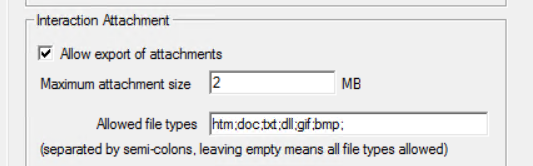
Mitigation: Restricting file types through the Toolkit effectively mitigates the risk of arbitrary or malicious file uploads. Ensure that antivirus scanning and user permissions are properly configured to enhance security.
Frequently Asked Questions
- How do I restrict file uploads to approved types?
- Use the Toolkit's Global Options to configure the Allowed File Types, ensuring only safe file extensions are permitted for upload.
- What if I need to allow a new file type for uploads?
- Add the new file type to the Allowed File Types in the Toolkit, then restart the Pivotal Business Server and any linked applications to apply changes.
- How can I verify that the file upload restrictions are working?
- Attempt to upload a file with a disallowed extension and confirm that the system blocks the upload, indicating that restrictions are in place.
Priyanka Bhotika
Comments